UrbanClap

Overview
UrbanClap, a home services platform, experienced a decline in bookings during the pandemic. This project explored solutions to rebuild trust, reinforce safety, and improve the user experience in order to restore engagement and platform reliability.
My Role
As a UX designer, I led the end-to-end design process — from research and problem framing to translating user pain points into impactful solutions. I crafted wireframes that addressed both functional requirements and emotional user needs, ensuring a balanced and human-centered experience.
Project Goal
To develop a UX strategy that addresses safety and trust concerns, with the goal of rebuilding user confidence and increasing home service bookings during a period of uncertainty.
Process
Secondary Research
A review of industry articles suggested that on-demand home services were widely considered recession-resistant. While users showed temporary hesitation, the convenience of these services made long-term adoption likely, particularly among tech-savvy users aged 20–35. Urban Company’s COVID-era safety measures — including temperature checks and mandatory PPE for service professionals — highlighted how visible precautions were becoming central to maintaining user trust.
Primary Research
A preliminary survey was circulated within our network to capture surface-level concerns, receiving 65 responses with valuable directional insights. Based on the findings, 6–7 participants were shortlisted for in-depth interviews; however, insight saturation was reached after five sessions. The research revealed two distinct user segments — tech-savvy users and old-school users — each with unique expectations and pain points, outlined below.
An empathy map was created to deepen our understanding of user behaviours, emotions, and pain points, helping translate research insights into more human-centred design decisions.
Challenges
The research was distilled into three core pain points:
Safety Visibility: Users lacked assurance about the health and safety measures taken by service providers.
Trust Deficit: Trusting strangers was harder than relying on acquaintances or familiar providers.
Local Accessibility: Online services often failed to meet daily needs when products weren’t readily available.
How Might We
With the challenges clearly defined, the next step was to reframe them as opportunities — opportunities to strengthen the service, improve the experience, and better support users in moments where trust and reassurance mattered most.
Solutions
I designed a trust-first UX strategy, integrating features that prioritise:
Safety Assurance:
Displayed health protocols, including provider certifications, PPE usage, and real-time health status.
A dedicated safety badge system to verify COVID-compliant service providers.
Building Trust:
Location-based reviews help users rely on feedback from nearby customers.
Verified local user badges for credible testimonials.
Enhancing Convenience:
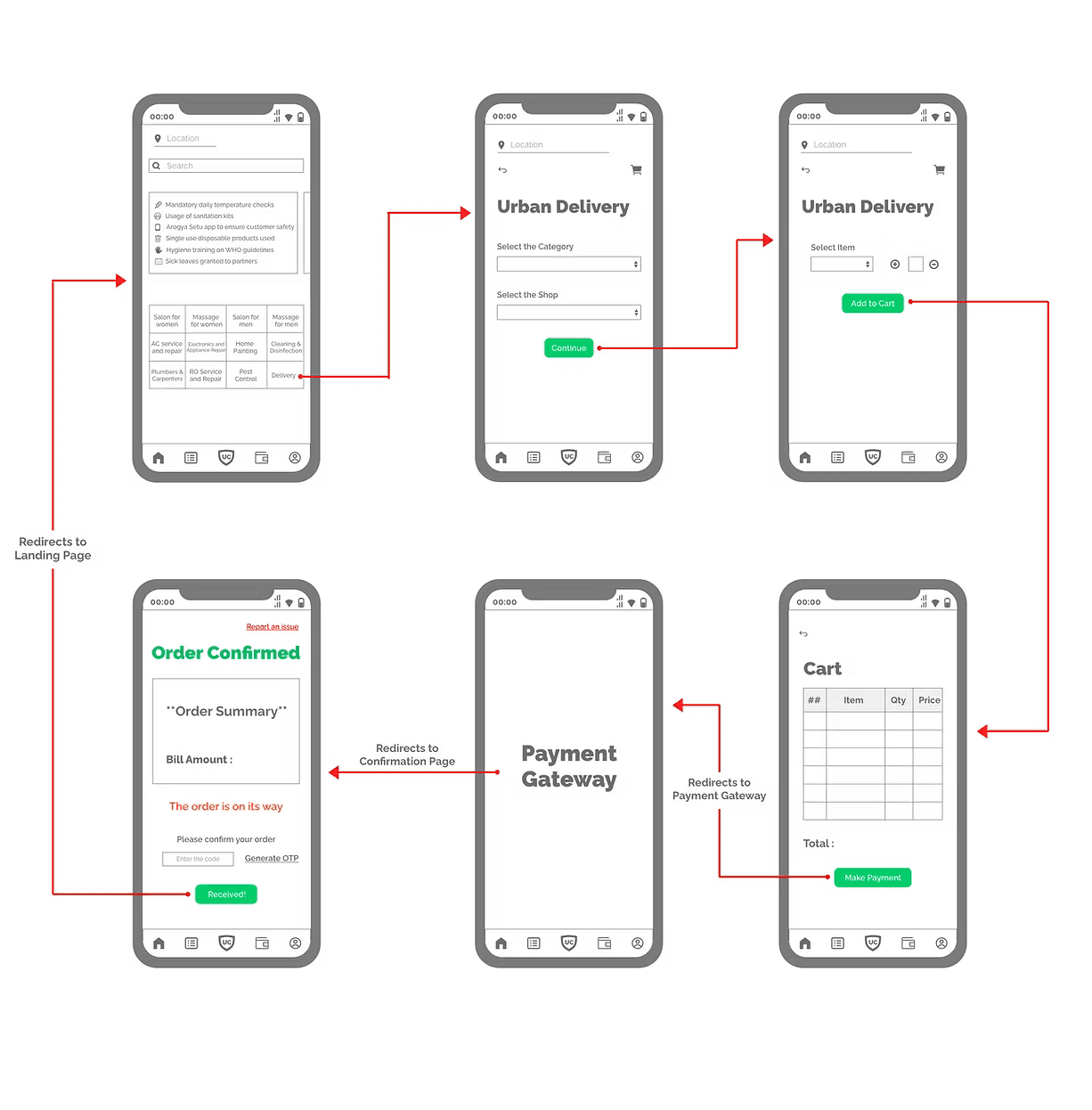
A local store delivery feature that enables nearby shops to fulfill essential service-related orders (e.g., cleaning supplies, spare parts).
Seamless booking with real-time availability indicators.
Lo-Fi Design Solutions
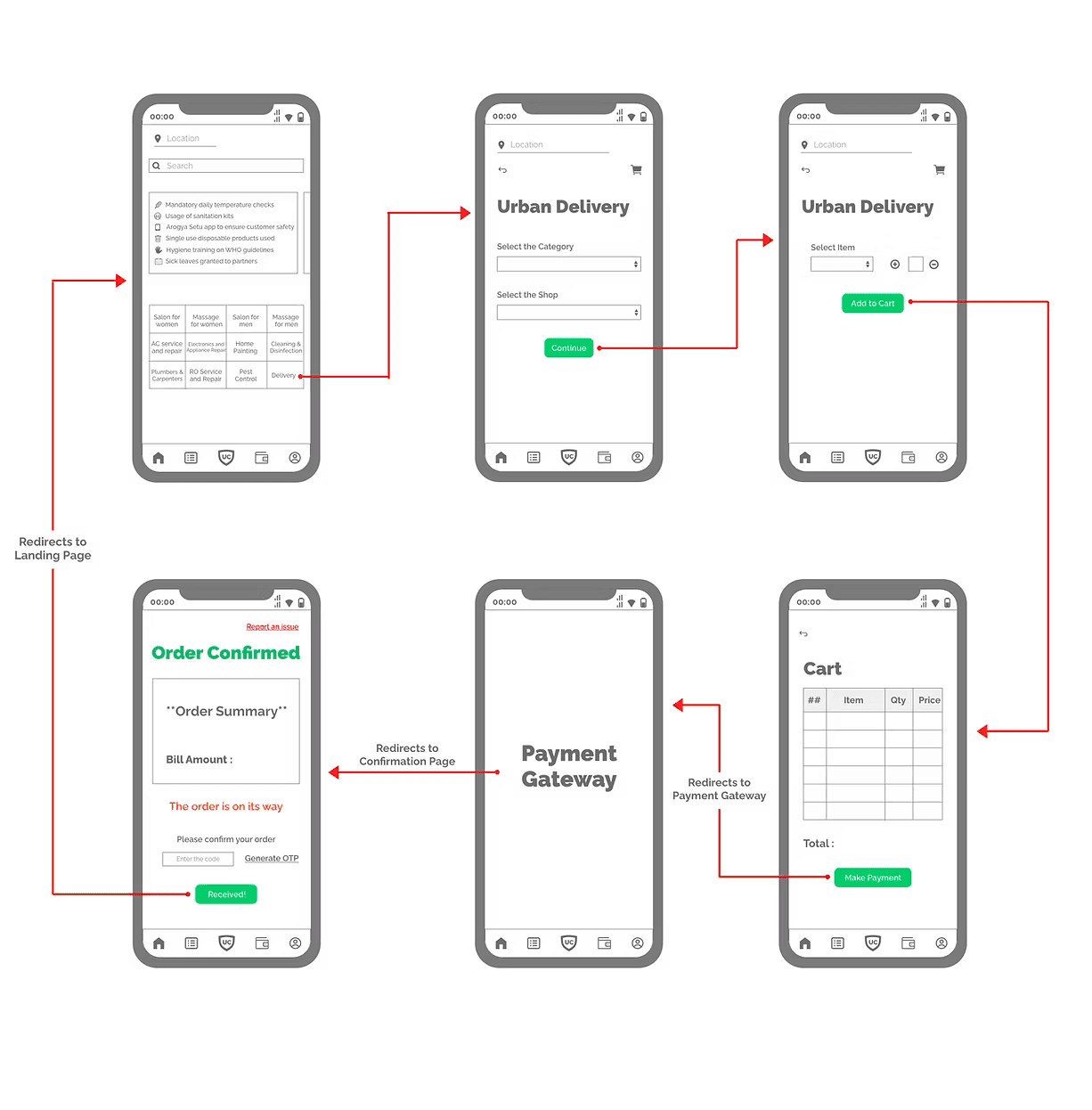
We sketched initial concepts to visualise workflows, focusing on simplicity and functionality.
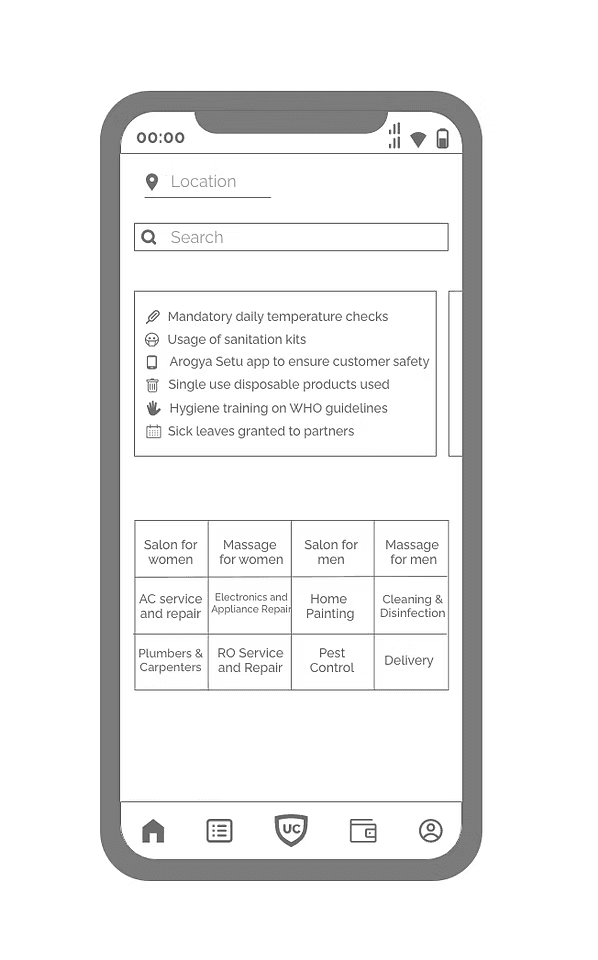
The precautionary measures taken by the members was suggested to be highlighted on the home screen to provide more transparency than posting just a blog about it.
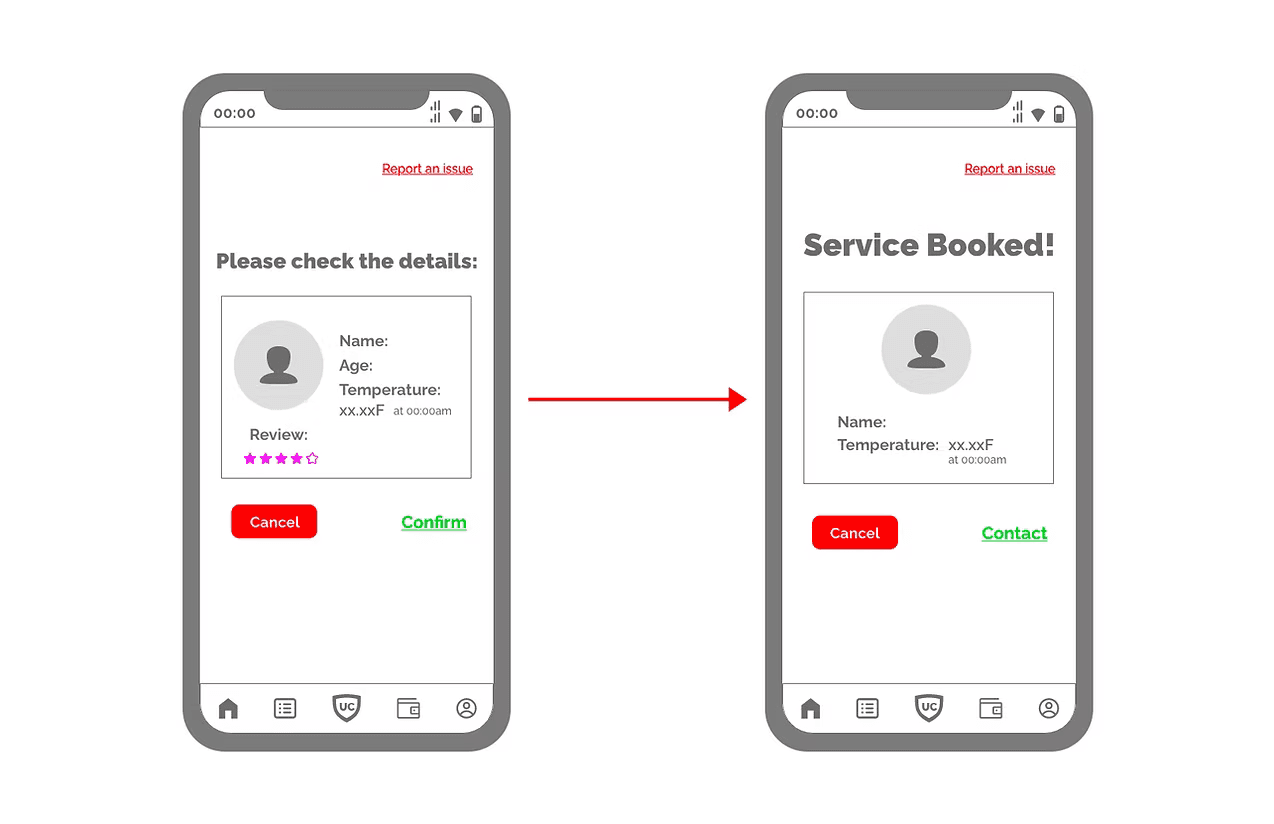
Instead of providing just the temperature of the service member visiting, a time stamp was also included to build trust to reassure the customers and build a sense of trust
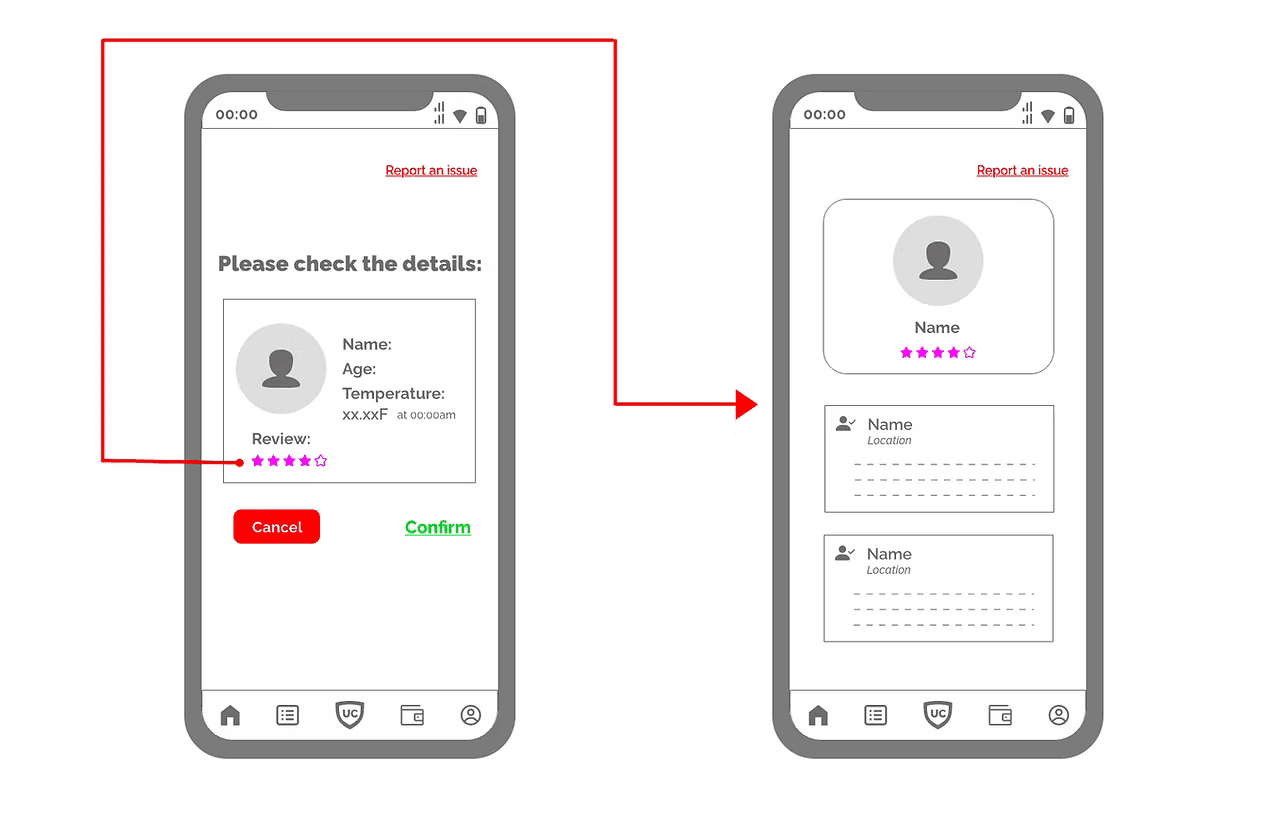
Location-based reviews being highlighted first for an of-chance of finding someone the customer they know and to build trust in the service member in the process
Testing & Refinement
We conducted usability testing with a diverse set of users to validate our solutions.
Key Improvements Based on Feedback:
Improved safety section visibility on the homepage.
Simplified review display, prioritizing local feedback first.
Streamlined store checkout flow, reducing booking friction.
Outcome
We conducted usability testing with a diverse set of users to validate our solutions.
Key Improvements Based on Feedback:
Improved safety section visibility on the homepage.
Simplified review display, prioritizing local feedback first.
Streamlined store checkout flow, reducing booking friction.
Other Projects

Whatsapp Business
Our team joined the GrowthSchool Hackathon to transform WhatsApp Business into a seamless platform for SMBs in India, enhancing online selling with intuitive features to streamline operations and boost efficiency.
PlaqueQuest
It is an interactive app designed to enhance the exploration of York’s Blue Plaques through real-time navigation, augmented reality (AR), and curated historical content. It provides users with an intuitive platform to discover, learn, and engage with the city’s rich heritage in a seamless and immersive way.

My Thesis : Effects of language diversity on Financial Inclusion and DFS usability in India
The study examines how language diversity affects digital financial service (DFS) usability in India, finding that low English proficiency users face significant barriers, leading to lower usability and financial exclusion. It highlights the need for better localisation in fintech platforms to improve accessibility and inclusion.
Interested in connecting?
Let’s talk projects, collaborations, or anything design!